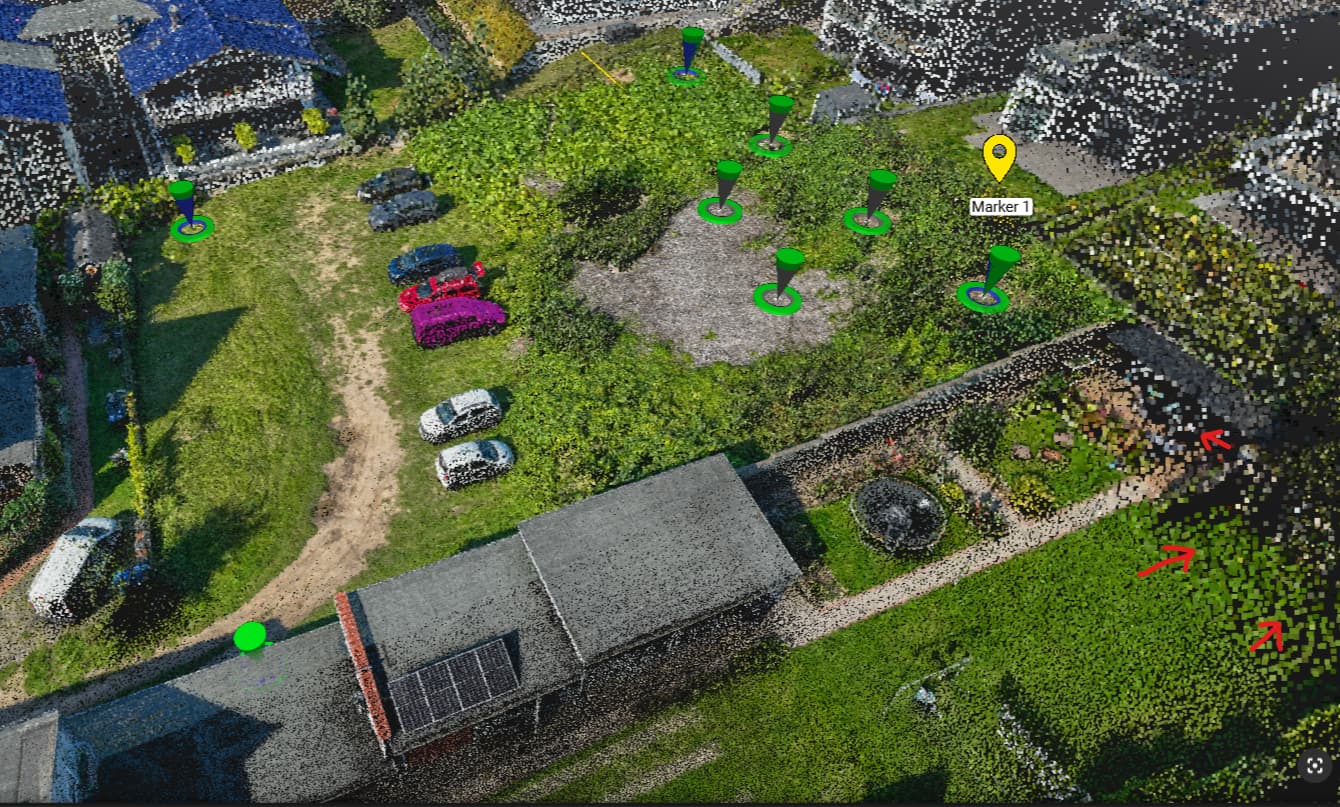
Since version 1.79 I have noticed an issue with the point cloud rendering. The points are no longer displayed consistently in size. Even if I adjust the sliders for point cloud size, the points remain uneven: along the edges, some points appear at least ten times larger than those in the center (see screenshot, red marker).
Please note: we are not looking at the automatic tie point cloud, but only at the dense point cloud (DPC).
When I rotate the model, the point sizes change again, which makes it really hard to focus and work precisely. As far as I know, this behavior did not exist before.
I kindly ask that the point cloud display is made uniform again (as it used to be and as is standard in other point cloud viewers), and that this bug is fixed as soon as possible.
I just found a setting in the Pix4Dmatic preferences/graphics: the Maximum Number of Points per Point Cloud for rendering. When I increase this value from the default 8 million to 100 million, the issue seems to disappear.
However, I would kindly ask you to check why the visualization looks so inconsistent at the other setting than max.
Could you please confirm whether this inconsistent behavior is intended, or if it should be considered a bug?
Thank you for your message. Your observation relates directly to how PIX4Dmatic is designed to efficiently handle very large datasets.
To ensure smooth, flicker-free rendering, the point cloud is spatially partitioned and uses multiple levels of detail. This means that areas farther from the camera are intentionally displayed with a lower density of points. To compensate for this and prevent the point cloud from looking sparse or having gaps in the distance, we dynamically increase the size of these farther points. This technique keeps the visual density of the point cloud looking homogeneous. The effect you are observing is a direct result of this performance-enhancing feature.
The alternative would be to keep all points at a fixed size. However, this would likely cause a different visual artifact: you would see distinct borders between the levels of detail, and distant areas would appear “holey”, like on the image below:
We are considering adding an option for fixed-size points in a future release. Is this a feature you would be interested in?
In the meantime, you can indeed try increasing “Maximum number of points per point cloud” in Preferences > Graphics. This will render more points overall, which may reduce the sizing effect, but please be aware that it will also increase the demand on your hardware. You may need to experiment to find the optimal value for your specific system and project.
I fully understand the technical rationale for the dynamic point size adjustment and the use of multiple levels of detail. However, from a user’s perspective, this implementation feels quite unusual—and, at least for our daily workflow, a bit confusing too. We regularly use a range of other point cloud solutions, and this specific visual effect does not occur in any of them, afaik, even when working with very large datasets and fixed point sizes.
For our applications, the shifting and inconsistent point display actually makes precise work significantly more difficult and is visually distracting. Additionally, I would like to note that previous versions of Matic did not exhibit this behavior, which means this change has been very noticeable in our routine workflows.
To be candid, I would personally favor a more traditional rendering approach, even if it means distant areas appear less dense, in order to maintain a consistent point size. This consistency is crucial for both analysis and clear project presentations.
I appreciate your efforts to optimize performance and rendering, but I wanted to provide this direct feedback based on hands-on field use. If there are settings or future improvements planned to address this, I would be very interested to hear more.
@maal there are specific corner-case projects where we have indeed observed differences in point size even with the maximum points toggle set to 100M. Could you share a project so we can investigate it? I will contact you via email as well.
These cookies are necessary for the website to function and cannot be switched off in our systems.
They are usually only set in response to actions made by you which amount to a request for services, such as setting your privacy preferences,
logging in, or filling in forms. These cookies do not store any personally identifiable information.
These cookies allow us to count visits and traffic sources so we can measure and improve the performance of our site.
They help us to know which pages are the most and least popular and see how visitors move around the site.
All information these cookies collect is aggregated and therefore anonymous.
If you do not allow these cookies we will not know when you have visited our site, and will not be able to monitor its performance.
These cookies may be set through our site by our advertising partner (Google).
They may be used by Google to build a profile of your interests and show you relevant adverts on other sites.
They do not directly store personal information but are based on uniquely identifying your browser and internet device.
If you do not allow these cookies, you will experience less targeted advertising.