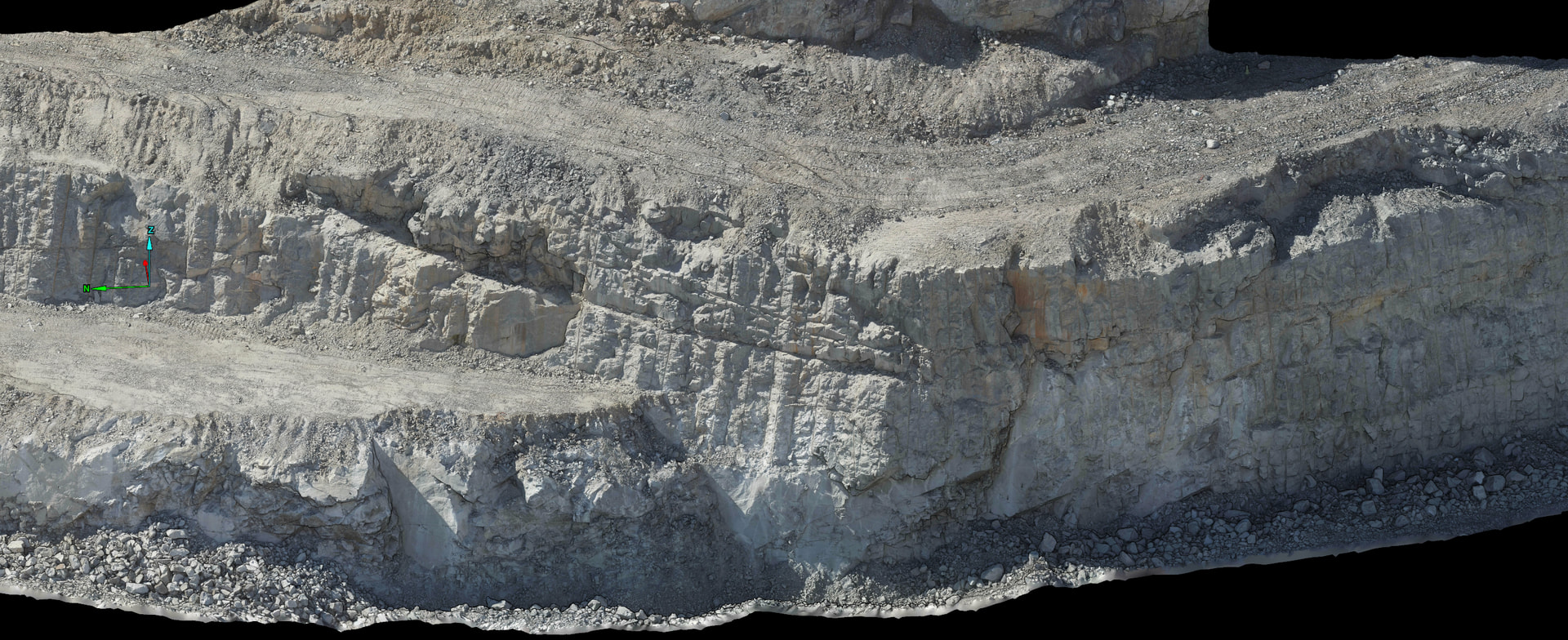
Have just updated from v1.76.0 to v2.5.0 to test out new features, but have found that the Mesh .obj export is extremely blocky…
Here’s an image of an area processed and exported from v1.76.0:
And here is the same area, processed and exported from v2.5.0:
(it doesn’t matter what detail level I choose for this export - they’re all very blocky)
The preview inside Pix4Dmatic looks fine though;
Any ideas?
Hi @aus-bd-survey
Is this visualization in the project or only in the output in OBJ format?
In the Pix4Dmatic project - it looks great.
Importing it into Maptek’s PointStudio is where it appears blocky.
I can then export it from PointStudio as a surface without the texture (.00t), re-import the surface and it’s still blocky.
This says to me that it’s not just a visualisation bug in PointStudio (especially when the older Pix4Dmatic exports worked fine)
Hi @aus-bd-survey
Could you please use a third-party software to import the mesh exported from PIX4Dmatic to see the OBJ? There is an open-source software that you can use for this: https://www.meshlab.net/
It is hard to identify the source of the issue only using images. Would it be possible to share the project?
Regards
Good morning Alvaro,
We are using a 3rd party software; Maptek’s PointStudio, as I mentioned above.
If you are able to provide a link to where I can upload the files, i will gladly share the project.
I’ve had similiar experiences when viewing models in external software. Looks great in matic, terrible elsewhere.
For me, the problem was level of detail (LOD) build, and a setting to “optimize performance” of the 3d model. Turning off that setting and rebuilding LOD in the external software fixed it.
I don’t know if your software has those options or not, but hopefully you can find them in there.
Hi @aus-bd-survey
Thank you for sharing the dataset. The issue in this case is not how the mesh is generated on PIX4Dmatic; the problem lies in how the OBJ is exported in terms of CRS.
To avoid the blocky mesh when you export, use Default as option in Export CRS-
Regards
Thanks Alvaro,
Changing the export CRS to Default did indeed solve the blocky mesh .obj.
My next question / issue; is there a way to dictate the Texture Size for the .obj export?
(Similar to .fbx export now, or older versions of matic that allowed this for .obj)
I’ve exported the data set at “level of detail: 3”, or roughly 3.6 million triangles, however the texture isn’t detailed enough.
Ideally we’d like to be able to set it to 32,768 x 32,768.
Hopefully the answer isn’t just to increase the level of detail - as this will make the file sizes too large (we don’t need an increase in number of triangles)
At the moment, we’re still stuck running v1.76 which allows us to dictate the maximum number of triangles and the texture detail separately.
@Alvaro_Santiago
Morning Alvaro, just checking in to see if had any info on my last message about improving the texture without increasing the number of triangles?
Hi @aus-bd-survey
I asked the team to see if it is possible. I will reach out to you as soon as they give their answer.
Regards
Hi @aus-bd-survey
Currently, it is not possible to increase the resolution of exports while reducing the number of triangles. I have shared your feedback with the team to keep them informed about this issue.
Good morning @Alvaro_Santiago ,
Thank you for getting back to us - it’s unfortunate that we are not able to separate the texture resolution from the number of triangles in these newer versions.
Looks like we will indeed be still be using an older version for the foreseeable future.
Would you like me to submit a feature request for this?
Yet again, another workaround.
Pix4D, you had a perfectly functional OBJ generation pipeline in V1.76 that produced user configurable triangle count, texture resolution, and when exported in the project CRS it was sufficiently detailed, with a single texture jpg and not blocky.
current version, a user cannot define the triangle count without negatively affecting the texture resolution, the LOD slider is a mess, the single or multiple textures button is redundant, you may get 1 or 15 textures, you only find out once exported. and now exporting in the projects CRS is broken,
i get you wanted to add additional functionality for cloud based operations. however its crazy to completely remove a functional aspect of the software for what is arguably worse for the end user.
@aus-bd-survey hang onto that 1.76 license… unfortunately we were signed up to the 3year sub and have now been forced over to the new V2.x matic. it has completely upended our deliverables to downstream users.