Hi everyone,
I’m currently working on a multispectral project and I’m facing a persistent elevation offset between my GCPs and the drone imagery in Pix4Dmapper.
Here is the setup I used:
- Drone: DJI Matrice 300 RTK
- Camera: MicaSense RedEdge-P Dual
- GCP collection: Spectra SP85 GNSS receiver (base and rover setup)
- Coordinate system used in the field:
- Horizontal datum: NAD83(CSRS)
- Coordinate system: MTM Zone 8
- Geoid model: HT2.0 (HT2_1997_GEO.GGF)
I collected GCPs using a base-rover method. The base was placed on a temporary point (not a known geodetic control point), and left running for a few hours to improve accuracy through averaging.
In Pix4Dmapper, I selected the coordinate system NAD83(CSRS) / MTM zone 8 for both the images and the GCPs. However, I’m seeing a consistent vertical offset in the model, the elevations from the GCPs don’t match the point cloud or the generated surface properly.
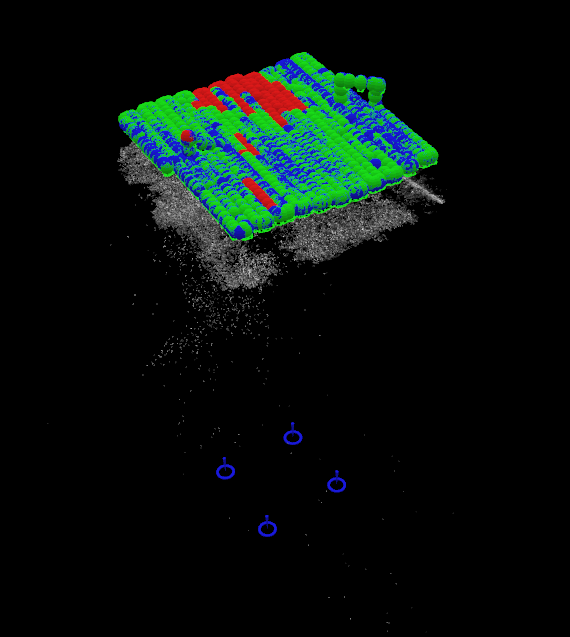
(Don’t mind the quality of the point cloud, I’m still trying to find the perfect flight parameters for our study area)
What we’ve already tried:
- Verifying the geoid model: HT2.0 is what we used during field collection, but Pix4Dmapper doesn’t allow direct selection of a geoid model.
- Manually converting orthometric heights to ellipsoidal heights using the formula:
Ellipsoidal height = Orthometric height + geoid separation
Based on our geoid separation (~ -31.683 m), but applying this correction didn’t resolve the issue. - Reimporting the GCPs with adjusted elevations, but the offset remains.
It seems like a vertical datum mismatch, but I’m not sure how to properly align everything within Pix4Dmapper. Has anyone encountered a similar problem using GCPs collected with a GNSS base/rover and images from the RedEdge-P?
Any help or suggestions would be really appreciated!
Best regards,
Lea