Environment
PIX4Dmatic version: 2.8.0
Project: 260803_Gartenfeld
Camera: DJI Mavic 3M, 1277 images, 6.4 ha, GSD 1.0 cm
CRS: ETRS89/UTM33N + DHHN2016 (EPSG:25833 + 7837)
GCPs: 19 GCPs, 6 checkpoints
Description
I processed a project using a Region of Interest (ROI). The ROI was defined once and used for all outputs.
All outputs except the mesh honour the ROI exactly and correctly:

Image 1: 2D outputs: orthomosaic and DSM are generated up to the ROI boundary without any gaps. I marked the ROI and the corner of the building, what is missing in 3d mesh.

Image 2: 3D point cloud: densified points extend cleanly up to the ROI boundary.

Image 3: 3D Gaussian Splatting: also complete up to the ROI boundary.

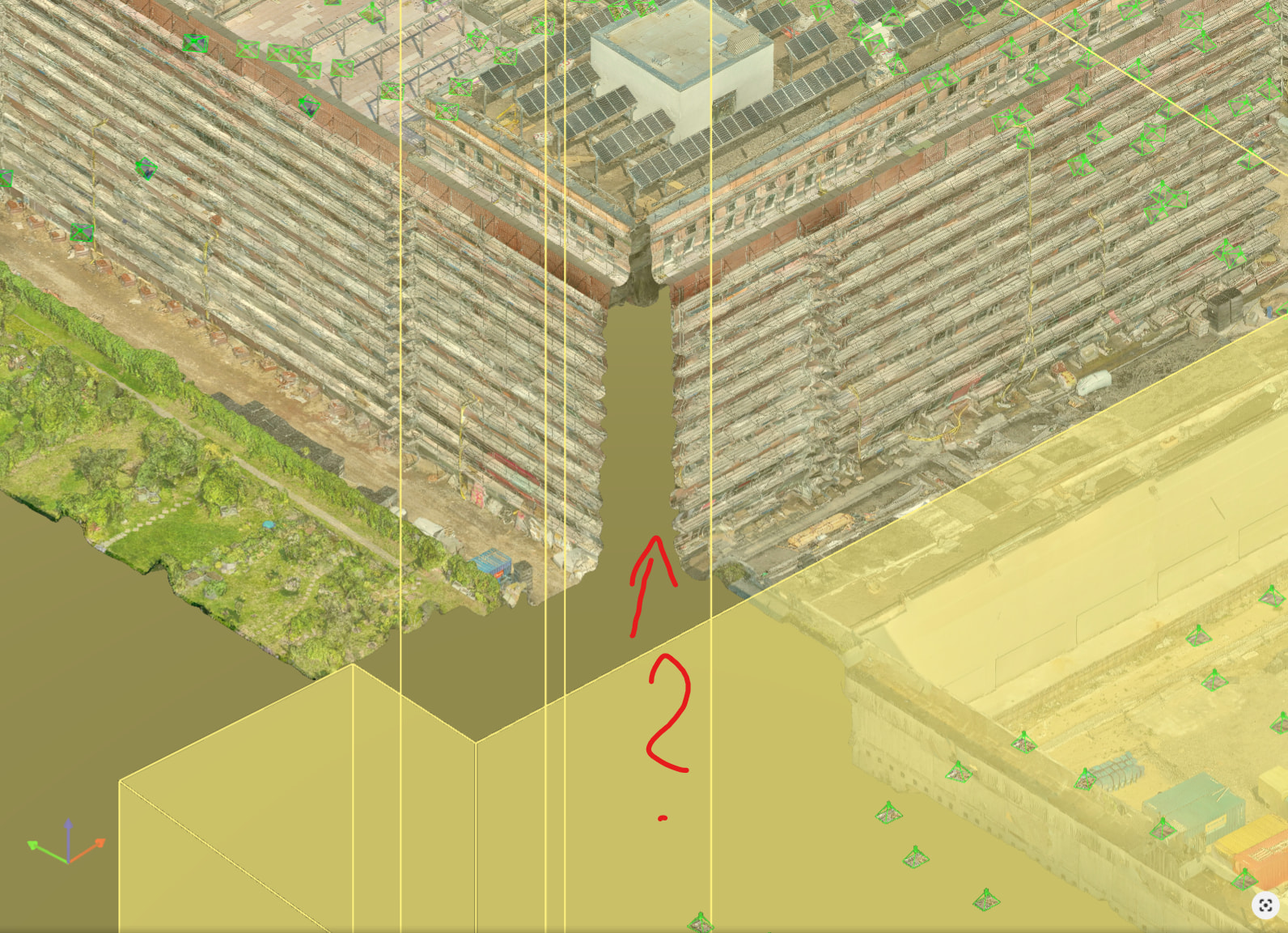
Images 4 and 5: Only the textured mesh is incomplete. At one building corner that lies clearly inside the ROI, parts of the mesh are missing. The missing area is not a thin edge artifact along the boundary; it is a wedge-shaped area set back from the ROI boundary by several metres, so the mesh edge does not follow the ROI polygon at all in this region.
Expected behaviour
The mesh should cover the full extent of the ROI, consistent with the point cloud, the 3DGS, the orthomosaic and the DSM.
Actual behaviour
The mesh is cut back well inside the ROI at this building corner, leaving a gap in the geometry and texture. Image coverage and point density in that area are good, as visible in the point cloud, so the input data does not appear to be the cause.
Questions
Is the ROI applied differently during mesh generation than during point cloud, orthomosaic and DSM generation, for example with an additional internal buffer or a different clipping logic?
Is there a known limitation where mesh triangles near tall vertical structures close to the ROI boundary get discarded?
Is there a workaround other than enlarging the ROI, for example a specific processing setting?
I can provide the project file, the ROI geometry or a log file on request. We’re heavily using Pix4dMatic almost daily, this error never occured before. Please provide some help!
Thanks a lot!
Best, Manuel


