I would like to merge 2 boundaries; one is the outline of the full vineyard, and the second is all the rows (as sub-polygons) in a block. I want to create one master boundary that eventually will have all of the vine rows as sub-polygons. Is merging two boundaries possible?
Hi, Chris this is not possible inside Pix4dfields. But you could export and merge the boundaries in Qgis.
1 Like
Thanks Julius, I will try that.
Use a GIS tool or image editor to merge boundaries by combining or unioning adjacent areas.
1 Like
What is the maximum number of sub-polygons per boundary please?
There’s no strict limit, it will depend on the project and processing device. If you are referring to marking vine rows in a field, it should work fine.
Hi Jose,
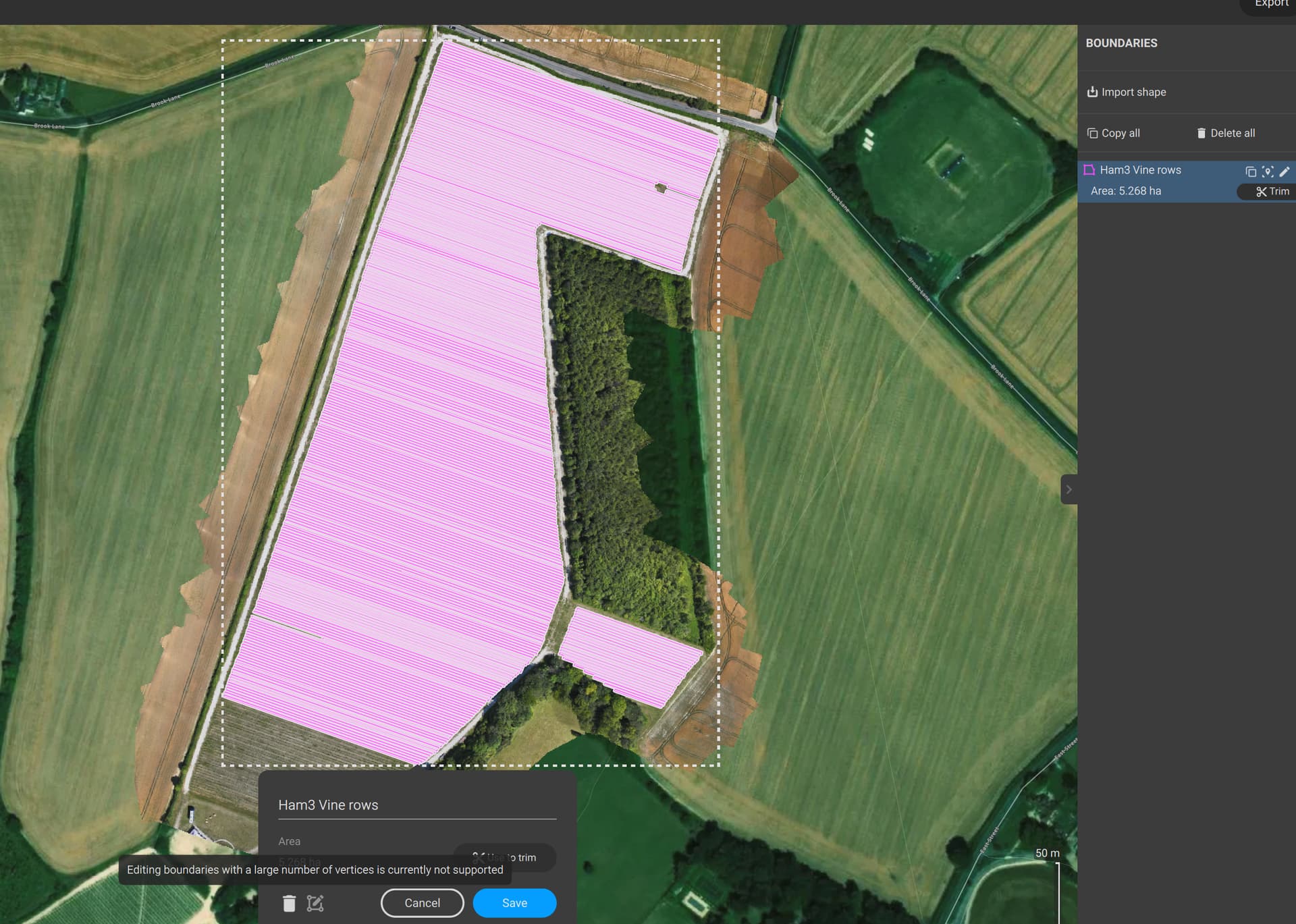
So I have hit the limit of sub-polygons, almost completed the field. This is irritating. I can’t even edit to delete some of the sub-polygons in order to split the vine block into two areas. I’ve spent hours on this and hit a brick wall. Now I have to give the client one large report and a ridiculous little one covering just 37 rows!
Hi Chris,
We understand it is not the best user experience. You can export the boundary, open it in QGIS, and split it into two or three files.
If you don’t know how to do it, feel free to share it; we can do it for you.
Hi Jose,
Sorry for the delayed reply. I thought I would try amd merge the two boundaries in QGIS which works until I import it into Fields, which still splits it into two! Is this due to the 1000 sub-boundary point limit Julius told me about?
I’ve attached the two original boundaries plus the QGIS merged one for you to try.
Thanks,
Chris
(Attachment Ham 3 LOWER vinerows.kml is missing)
(Attachment Ham 3 vinerows.kml is missing)
(Attachment ham3merged.kml is missing)
KML files not allowed, so here’s a zip..
(attachments)
lowaltkml.zip (41.5 KB)
Hi,
Yes, the problem is the 1000 subpolygons limitation. You have to split it in 2 files in order to import them as boundary in Pix4Dfields.
Sirio
For those complex shapefile boundaries, it may make sense or its your only option to either split the field so Pix4Dfields can still handle it, or you need to mask the data/trim the data in QGIS and then import them in Pix4Dfields for the analysis.
Hi, just following up on this; has there been any improvement on the boundary/subpolygon limit, or the function to at least edit (to reduce) a boundry that has hit the 1000 subpolygon limit?
Hi Chris, that will be supported in PIX4Dfields 2.14 (the one after the upcoming 2.13).
1 Like