Hello,
With the attachment below, can anyone suggest why does it show so many green lines and when we run the initial processing we found that most of the images are not calibrated only 10% of the images are calibrated .

Can anyone help , Thank You
Hello,
With the attachment below, can anyone suggest why does it show so many green lines and when we run the initial processing we found that most of the images are not calibrated only 10% of the images are calibrated .
Can anyone help , Thank You
This is likely because the time stamps on the images are incorrect or do not correspond to when the images were actually captured.
Can you describe your project to us in more detail? What camera are using, how was the data acquired, etc.
Project Overview
This project involved collecting aerial data for forest area with the goal of creating 3D models and mapping terrain.
Drone and Camera Details
We used a Trinity F90+ equipped with a camera model Sony RX1RM2_35.0_7952x5304
Flight and Data Acquisition Method
Flight missions were planned using QBase3D with flight parameters set to 80% front overlap and 75% side overlap at an altitude of 210-230 meters AGL.
Data Retrieval and Processing
The data was stored on an onboard SD card and transferred to a computer for processing.
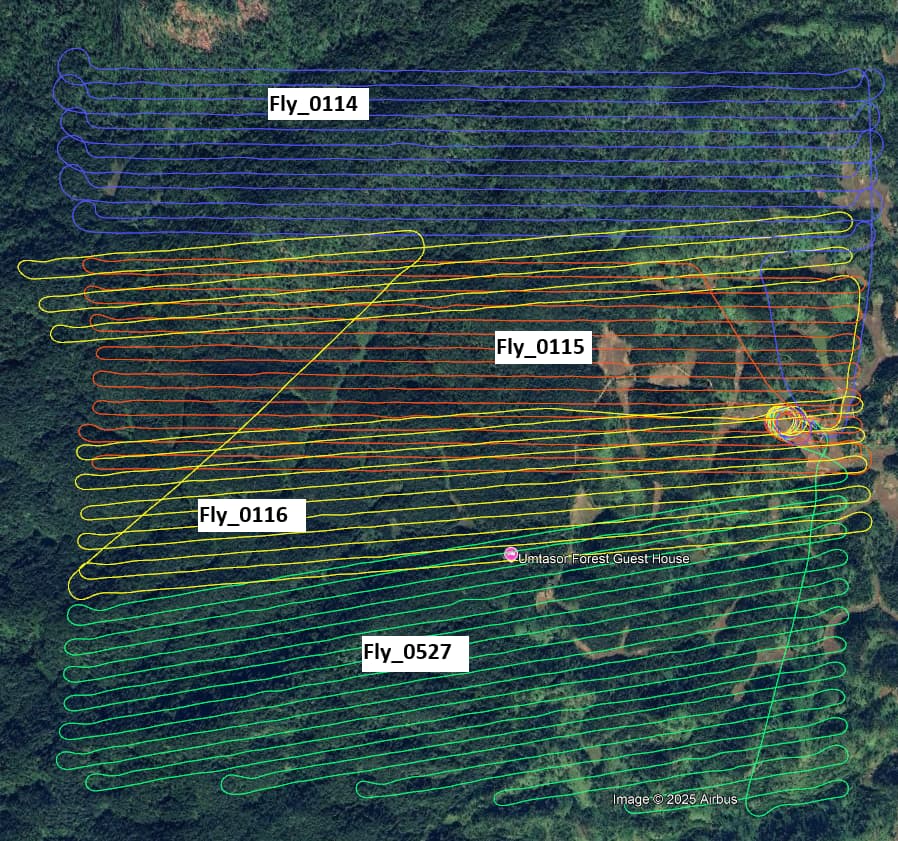
We conducted a total of four UAV flights, designated as Fly_0114, Fly_0115, Fly_0116, and Fly_0527. Notably, Fly_0114 and Fly_0527 were flown almost simultaneously using two separate Trinity F90+ drones, with only a 20-minute gap between their takeoff times. Fly_0114 was launched first, followed by Fly_0527, and both drones were airborne concurrently for approximately 25 minutes.
The remaining two flights, Fly_0115 and Fly_0116, were conducted independently after the completion of the first two.
For image geotagging, we used Post-Processed Kinematic (PPK) correction in QBase 3D, referencing our base station (iBase) for high-accuracy positioning. The image data was then processed using Pix4Dmapper. However, as you’ve seen, the output did not meet expectations, resulting in the issues shown earlier.
Attached below are the screenshots of the kml flight lines and some screenshots from pix4dmapper.
I’m guessing there was an issue with the time stamps during the PPK process. Despite this, it should still be possible to process the dataset. Can you attach the PDF quality report to the posting? We can take a look to see what else could be going on.
I have attached the quality report below,
Umtasor full_report.pdf (2.9 MB)
I see you processed using the rapid template. Have you tried using 1/4 image scale under step 1?
I also suggest using the Alternative calibration method. This might be more appropriate for your project.
We tried processing as you suggested its improving but still so many uncalibrated images. Can you suggest something for help.
Attached quality report below,
Quality_report.pdf (2.9 MB)
How did it perform using 1/4 image scale?
Same error,
Quality_report.pdf (2.9 MB)
These look like the exact same reports.
Sorry my bad, attached below is the right one
Umtasor1_4_report.pdf (2.6 MB)
It looks like the 1/2 scale performed slightly better. But the results are still not great. It looks like you flew the project on a flat plane. However, it also appears that the terrain rises and falls. From what I can tell, your overlap might be too low in the areas where the terrain rises. This will cause the cameras to not calibrate. Ultimately, you might need to fly this at a higher elevation to ensure proper overlap throughout the project.
Okay ,
Given that we have existing UAV data and are unable to conduct a return field survey, could you suggest any techniques or methodologies to maximize the utility and reliability of the available dataset?
Hi Victor,
Can you try splitting the project up into subsections? You might be able to get some of the areas to calibrate if they are separate. If successful, then you can merge them back in a later step.
We have tried that also but the errors are the same .
I am sorry but ultimately the overlap is likely too low to get good results.