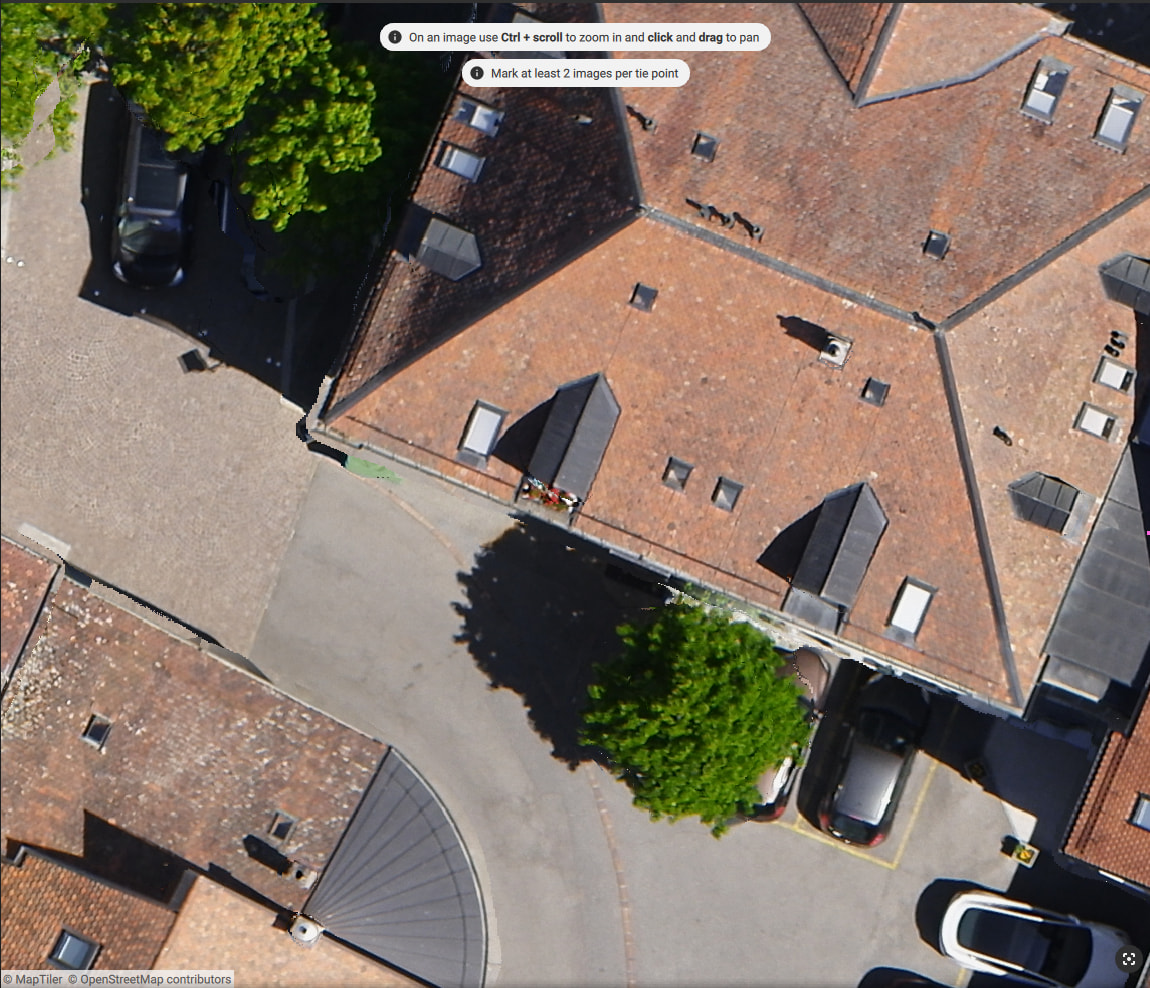
I’m having some issues with my orthophoto generation. I want to get sharp, nice looking edges but they become sort of blurry, as you can see in the attached photos.
I’ve tried a lot of different settings, but I always end up with more or less weird looking edges. I’ve tried with nadir photos only, and nadir + oblique photos. I tried with and without GCPs. I’ve tried changing the surface smoothing on the DSM. I’ve tried laborating with the outlier removal.
Do I have to go into the pointcloud and manually remove certain points around all the buildings, caravans, structures etc? It would take a lot of time to do all of this manually. Or what else can I do to get nice and sharp edges?
The quality control report is also attached from when I did the project with nadir + oblique photos.
The issue you’re seeing is primarily related to the quality of the point cloud and how well the scene was reconstructed. This depends on several factors, including image overlap—please ensure it is at least 70% or higher.
One important detail I noticed is that Multiscale was turned off during densification. This can significantly impact point cloud quality and, in turn, the sharpness of roof edges. For this project, I recommend enabling Multiscale and reprocessing, as it should help improve the result.
Yes, the side overlap was 75% and the frontal overlap was 80%.
I tried turning multiscale on and off to see if it produces different results, but I did not notice any improvement.
I also tried the example dataset “Urban area” found on Example datasets - PIX4Dmatic. I still get the same effect around building edges - and I assume the example dataset is captured according to best practice? I also attached the quality report for this project. What settings am I missing to get sharp edges that does not blend into the street?
I reviewed your quality report, and one thing stood out to me that might help you achieve sharper edges in PIX4Dmatic. When generating the DSM, turn off surface smoothing completely. The surface smoothing can introduce this effect because it attempts to blend the different elements of the DSM (and subsequently the orthomosaic) together to create a softer image. Turning this off entirely can result in better reconstructions for rectilinear edges.
It might not be a perfect fix, but give that a try (regenerate the DSM and the orthomosaic in that case) and see if that results in better edges.
These cookies are necessary for the website to function and cannot be switched off in our systems.
They are usually only set in response to actions made by you which amount to a request for services, such as setting your privacy preferences,
logging in, or filling in forms. These cookies do not store any personally identifiable information.
These cookies allow us to count visits and traffic sources so we can measure and improve the performance of our site.
They help us to know which pages are the most and least popular and see how visitors move around the site.
All information these cookies collect is aggregated and therefore anonymous.
If you do not allow these cookies we will not know when you have visited our site, and will not be able to monitor its performance.
These cookies may be set through our site by our advertising partner (Google).
They may be used by Google to build a profile of your interests and show you relevant adverts on other sites.
They do not directly store personal information but are based on uniquely identifying your browser and internet device.
If you do not allow these cookies, you will experience less targeted advertising.