Important Update: PIX4Dmapper Crashing via Windows Explorer

Dear Valued Pix4D Customer,

We are writing to inform you of a critical bug currently affecting Windows Explorer (the windows used to browse, open, or save your files) within our Pix4D desktop applications: PIX4Dmatic, PIX4Dsurvey, PIX4Dfields, PIX4Dreact, and PIX4Dmapper.

We understand this may severely disrupt your workflow, and we sincerely apologize for any inconvenience this may cause.

What is the issue?

The bug causes our desktop applications to crash when interacting with Windows Explorer, particularly when trying to open or save files. It appears to only affect customers who have Microsoft 365 installed.

What error message appears when this issue occurs?
When the software crashes due to this bug, you may experience an unexpected shutdown of the application during file operations (such as opening, saving, or browsing for files) through Windows Explorer. In some cases, this will be accompanied by an error dialog, while in others, the application may simply close without warning and without saving your most recent changes.

  • PIX4Dmatic and PIX4Dsurvey display an error message.
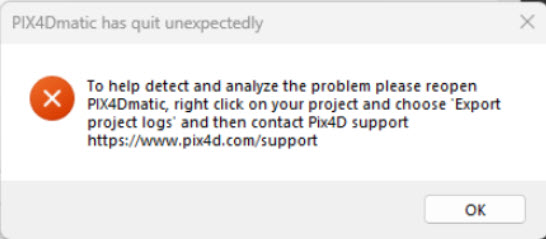
  • PIX4Dmapper, PIX4Dfields, and PIX4Dreact close unexpectedly without showing an error
    message.

Temporary Recommendation and workaround:

Our development team is actively working to release a fix as soon as possible. In the meantime, the general recommendation is to temporarily uninstall Microsoft 365, if possible. And more specifically:

  • For PIX4Dmatic and PIX4Dsurvey, use drag-and-drop for file operations whenever possible within the application, rather than relying on Windows Explorer dialogs.
  • For PIX4Dfields and PIX4Dreact, please contact Support and select in the ticket creation for these solutions, the topic Processing error/Crash.
  • For PIX4Dmapper, dragging and dropping images to create a new project works; however, importing GCPs or marks may cause the software to crash.

We are prioritizing a solution and will send another update as soon as the fixes are available on Download Pix4D software. Thank you for your patience and continued support.

If you have any questions or require immediate assistance, please do not hesitate to contact our support team.

Sincerely,

The Pix4D Support Team

1 Like

Any updates or progress being made on this issue? I’ve got projects with GCPs that need to be processed in Pix4Dmapper. Any chance the software can be altered to import GCPs by a drag and drop method like the photos?

Uninstalling Microsoft 365 did not solve the issue for me.

@Andrew_Giles1 The uninstallation of Microsoft 365 should fix the issue. I would suggest you to go to the control panel>> Programs>> Uninstall a program and see if there is any files related to Microsoft 365. If there is any files remaining with that name, it might be the reason for the crash.

Does Microsoft OneNote need to be uninstalled? All of Microsoft Office? Microsoft 365 seems to be a broad category as for as Microsoft goes.

@Andrew_Giles1 What file did you delete initially? You don’t need to delete all the file named Microsoft because you might lose information. You only need to the uninstall program named Microsoft 365.

Hey Kapil, I didn’t delete any files, only uninstalled applications that had the term Microsoft 365 in the title, there were a few in various languages. After removing all of those, Pix4D would still crash. I then removed all of the OneNote applications of which there were a few in different languages. OneNote is considered a part of Microsoft 365. I also went ahead with removing OneDrive and now Pix4D works again. Luckily I don’t really need any of those Microsoft apps on my processing machine.

Hi @Andrew_Giles1

Thank you for your detailed report. I’m happy to hear that Pix4D products work again on your device.

Out of curiosity, did you uninstall the “standard” OneDrive or “OneDrive for Business”?

Cheers,
Daniele

Hello @Daniele_Lecci

It was Microsoft OneDrive and it appeared it was last updated on 2/7/26.

1 Like

Hi @Andrew_Giles1,

Thank you for this helpful piece of information. This will be really helpful for our devs.

Cheers,
Daniele

Hi, will be released a fix also for customer with license valid but with no current mantainance? thank you.

Hi @Marco,

Welcome to the Pix4D Community :handshake:.

I’m sorry to hear that you are affected by this problem. We are still working on finding the best way to provide an update to our users.

In the meantime, could you please install all pending Microsoft 365 updates and restart the computer? We have reports that this issue disappeared after updating Microsoft 365.

Please let me know if this helps you.

Kind regards,
Daniele

@Marco Can you confirm if the issue is solved for you, too, after updating Microsoft 365?