Dear Valued Pix4D Customer,
We are writing to inform you of a critical bug currently affecting Windows Explorer (the windows used to browse, open, or save your files) within our Pix4D desktop applications: PIX4Dmatic, PIX4Dsurvey, PIX4Dfields, PIX4Dreact, and PIX4Dmapper.
We understand this may severely disrupt your workflow, and we sincerely apologize for any inconvenience this may cause.
What is the issue?
The bug causes our desktop applications to crash when interacting with Windows Explorer, particularly when trying to open or save files. It appears to only affect customers who have Microsoft 365 installed.
What error message appears when this issue occurs?
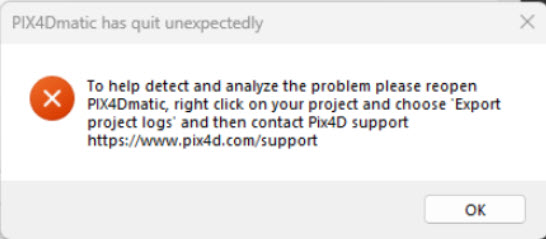
When the software crashes due to this bug, you may experience an unexpected shutdown of the application during file operations (such as opening, saving, or browsing for files) through Windows Explorer. In some cases, this will be accompanied by an error dialog, while in others, the application may simply close without warning and without saving your most recent changes.
-
PIX4Dmatic and PIX4Dsurvey display an error message.
-
PIX4Dmapper, PIX4Dfields, and PIX4Dreact close unexpectedly without showing an error
message.
Temporary Recommendation and workaround:
Our development team is actively working to release a fix as soon as possible. In the meantime, the general recommendation is to temporarily uninstall Microsoft 365, if possible. And more specifically:
- For PIX4Dmatic and PIX4Dsurvey, use drag-and-drop for file operations whenever possible within the application, rather than relying on Windows Explorer dialogs.
- For PIX4Dfields and PIX4Dreact, please contact Support and select in the ticket creation for these solutions, the topic Processing error/Crash.
- For PIX4Dmapper, dragging and dropping images to create a new project works; however, importing GCPs or marks may cause the software to crash.
We are prioritizing a solution and will send another update as soon as the fixes are available on Download Pix4D software. Thank you for your patience and continued support.
If you have any questions or require immediate assistance, please do not hesitate to contact our support team.
Sincerely,
The Pix4D Support Team