Hi all!
I have a few requests regarding design overlays:
-
Continuity of design overlay info between scans within the same site.
-
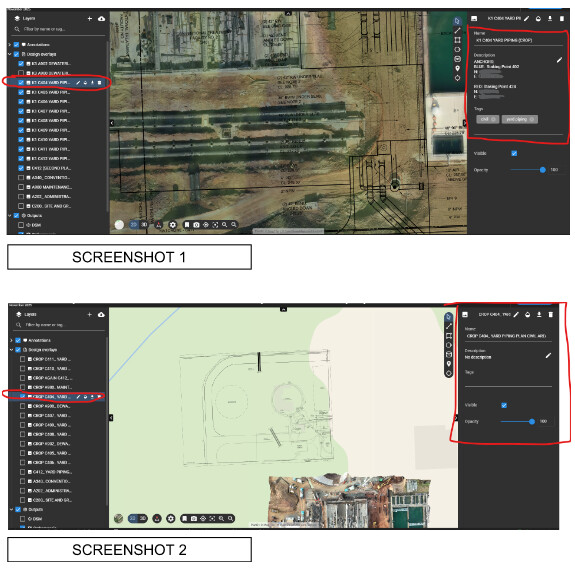
I really like the design overlay feature and find it very useful. I really love that the overlays apply to every scan within a site so that I don’t have to re-do the process of uploading them. The feature I am requesting is to have it so that any changes to the name, description, and tags of an overlay apply to that overlay across all scans on within that site. Example: In Screenshot 1, the overlay is named “K1 C404 YARD PIPING (CROP)” and has a description (edited for data privacy) and has been tagged with “civil” and “yard piping.” In screenshot 2, I have switched to a different scan within the same site. The overlay is no longer named “K1 C404 YARD PIPING (CROP)” (it still has the original name taken from the name of the file used for the overlay) and has no description or tags. This causes me to have to go back and copy and paste the name and description as well as re-assign every tag for every design. I would really love if the information could be carried over as well.
-
-
Sort overlays into sub tabs/groups
- I think the ability to group design overlays into separate tabs under the “design overlays” tab would be extremely useful. The tabs would function the same way the “design overlays” tab or the “outputs” tab function with some added features:
- Can be toggled on and off to show or hide all overlays within the tab (while remembering the position of the overlays. Like how the annotations that were already turned off are not turned back on when the overall annotations tab is turned off and back on)
- Can be given custom names. (Possibly even tagged / given descriptions like the overlays can)
- Tabs can be re-ordered via click-and-drag.
- Can be nested within each other, ex: The CIVL tab could have a sub-tab called YARD PIPING.
- I think the ability to group design overlays into separate tabs under the “design overlays” tab would be extremely useful. The tabs would function the same way the “design overlays” tab or the “outputs” tab function with some added features:
-
Tags follow the case they were input with
- Currently typing “CIVIL” would create a tag named “civil” where I would prefer if it would stay “CIVIL”