### Author:  [@david8](https://community.pix4d.com/u/david8)
#### Post date: [August 20, 2025, 2:43am UTC](https://community.pix4d.com/t/unable-to-install-new-version-of-fields/34035/1 "2025-08-20T02:43:52Z")
I previously used Fields many years ago and want to revisit the workflow of the current version with the trial before subscribing. Old version was uninstalled a long time ago.
During the install process the wizard is looking for the Pix4dfields 1.3.0 msi (not on computer) and then error box 'The older version of Pix4dfields cannot be removed. Contact your technical support group.
I have been through all the suggested processes to uninstall / remove, but no more Pix4d files can be found.
Any suggestions to allow the installation of the current version.
---
### Author:  [@Jose.Arnaudo](https://community.pix4d.com/u/Jose.Arnaudo)
#### Post date: [August 20, 2025, 8:25am UTC](https://community.pix4d.com/t/unable-to-install-new-version-of-fields/34035/2 "2025-08-20T08:25:59Z")
Hi David,
Welcome back! Please follow this article: [How to uninstall PIX4Dfields](https://support.pix4d.com/hc/en-us/articles/11459855891229)
Make sure to delete **registry** information, and delete _C:\Users\\AppData\Local\pix4d\Pix4Dfields_ and try again.
let us know.
---
### Author:  [@david8](https://community.pix4d.com/u/david8)
#### Post date: [August 20, 2025, 9:59pm UTC](https://community.pix4d.com/t/unable-to-install-new-version-of-fields/34035/3 "2025-08-20T21:59:36Z")
Hi Jose, I have gone through all those steps including checking the registry (nothing there) and still unable to complete the installation. Would there be hidden files somewhere its detecting?
---
### Author:  [@Jose.Arnaudo](https://community.pix4d.com/u/Jose.Arnaudo)
#### Post date: [August 22, 2025, 8:34am UTC](https://community.pix4d.com/t/unable-to-install-new-version-of-fields/34035/4 "2025-08-22T08:34:33Z")
Please confirm you have done all these steps:
1. In the Windows Search, type **Add or remove programs**.
2. Scroll to find **PIX4Dfields** and click the application.
3. Click **Uninstall**.
4. On the path where PIX4Dfields was installed (default is _ **C:\Program Files\PIX4Dfields** _), ensure this folder no longer exists. If it exists, **DELETE** this PIX4Dfields folder.
5. In the Windows Search, type **RegEdit** and search for the folder stored in the path: _HKEY\_CURRENT\_USER\Software\pix4d\pix4dfields_ and ensure this folder no longer exists. If it exists, **DELETE** this PIX4Dfields folder.
**Delete** folder\_ "_C:\Users\\AppData\Local\pix4d\Pix4Dfields"._ Deleting it can help with some crashes, but this will cause projects not to be imported anymore to PIX4Dfields.
6. Restart the computer.
7. Reinstall the latest version of the software: [https://www.pix4d.com/download/pix4dfields/](https://www.pix4d.com/download/pix4dfields/)
Please share screenshots of each one.
---
### Author:  [@david8](https://community.pix4d.com/u/david8)
#### Post date: [August 23, 2025, 12:29am UTC](https://community.pix4d.com/t/unable-to-install-new-version-of-fields/34035/7 "2025-08-23T00:29:39Z")
Hi Jose
Pix4d fields was uninstalled on this computer probably 5 years. I have attached a pdf with screenshots of the steps and some file system searches completed.
[Pix4d screenshots.pdf](https://community.pix4d.com/uploads/short-url/9LiaTAOvPdW8oB6KxUMLjNbI6vV.pdf) (598.9 KB)
We use XAG spray drones and want to check the workflow using Pix4d fields instead of the XAG map process.
---
### Author:  [@Jose.Arnaudo](https://community.pix4d.com/u/Jose.Arnaudo)
#### Post date: [August 25, 2025, 8:39am UTC](https://community.pix4d.com/t/unable-to-install-new-version-of-fields/34035/8 "2025-08-25T08:39:43Z")
> [@Jose.Arnaudo](#):
>
> C:\Users\AppData\Local\pix4d\Pix4Dfields
Hi, I don’t see a proof of deletion for this folder _C:\Users\AppData\Local\pix4d\Pix4Dfields_
---
### Author:  [@david8](https://community.pix4d.com/u/david8)
#### Post date: [August 25, 2025, 9:01am UTC](https://community.pix4d.com/t/unable-to-install-new-version-of-fields/34035/9 "2025-08-25T09:01:58Z")
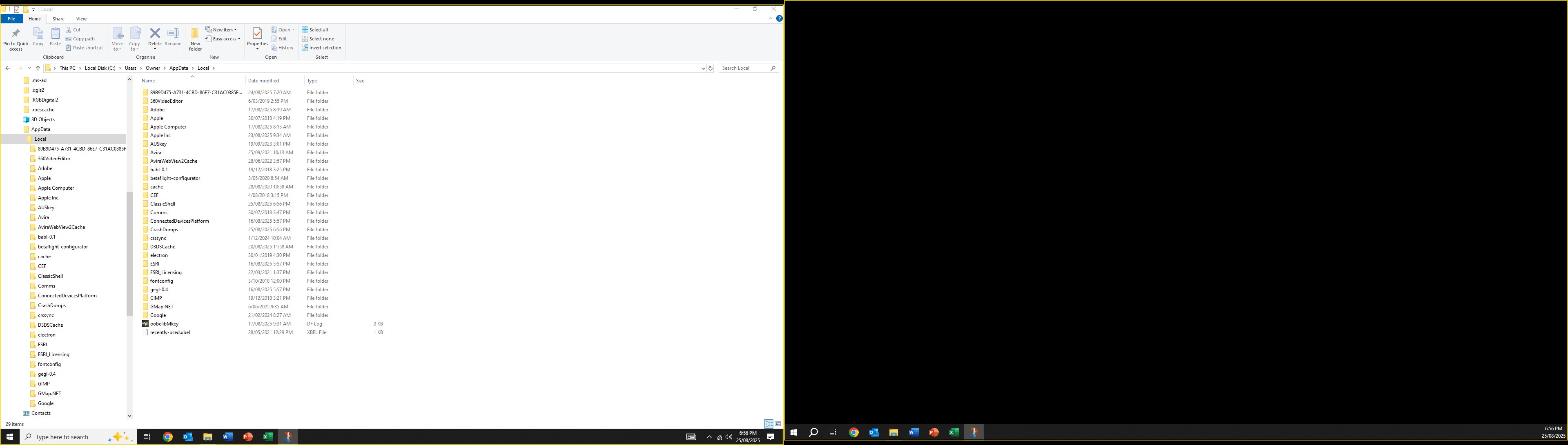
Screenshot of the related folder.
---
### Author:  [@Jose.Arnaudo](https://community.pix4d.com/u/Jose.Arnaudo)
#### Post date: [August 25, 2025, 12:14pm UTC](https://community.pix4d.com/t/unable-to-install-new-version-of-fields/34035/10 "2025-08-25T12:14:49Z")
THank you,
Could you check that you checked the “Current\_User” folder in the Registry:
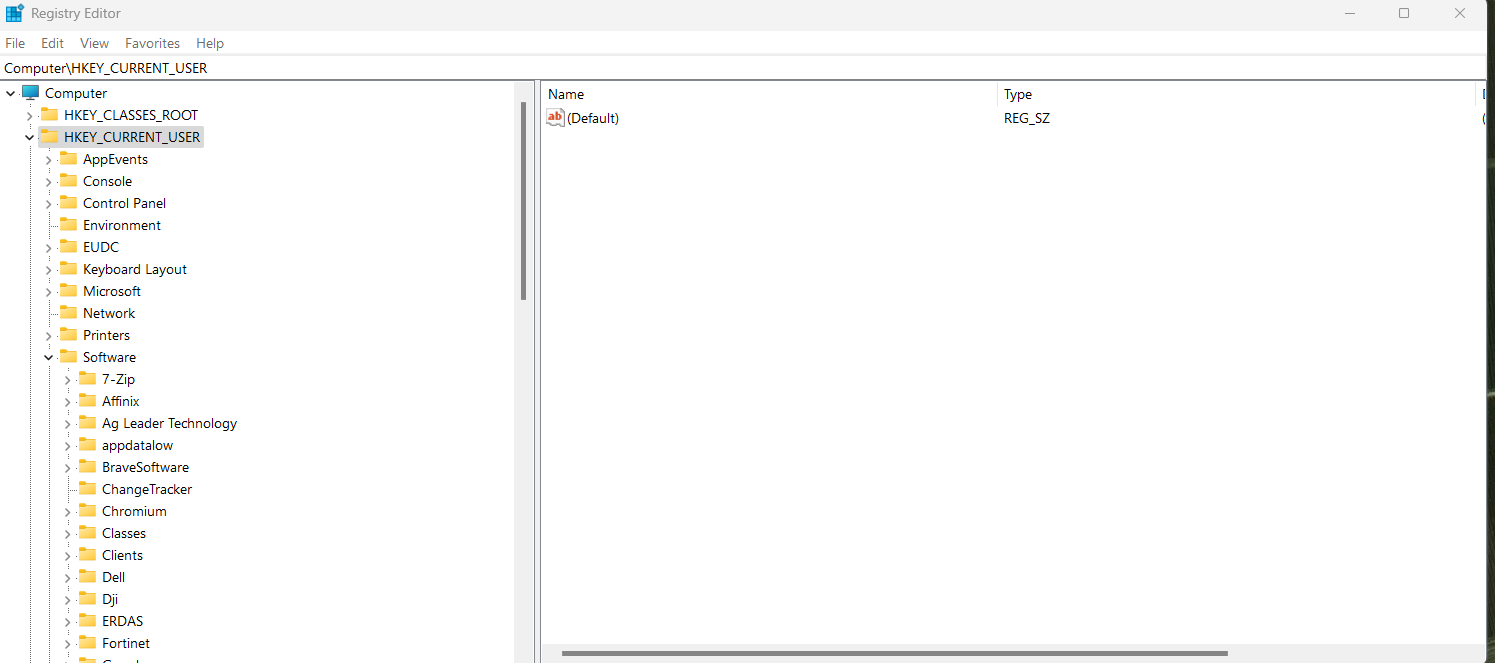
I cant see it form the screenshot.
Please also check “Program files (86)
We would advise:
- Move the installer to the C drive and start it from there.
- **Run as Administrator:** Right-click the installer file and select **Run as administrator**. This can sometimes bypass permission-related installation issues.
- **Restart the `Windows Installer` service:** Press **Windows key + R** , type `services.msc`, find **Windows Installer** , right-click it and choose **Restart**.
---
### Author:  [@david8](https://community.pix4d.com/u/david8)
#### Post date: [August 30, 2025, 3:28am UTC](https://community.pix4d.com/t/unable-to-install-new-version-of-fields/34035/11 "2025-08-30T03:28:03Z")
Hi Jose,
I’ve checked and tried all the instructions, and none of them work. It appears the program wasn’t uninstalled correctly years ago. I’ll look at loading onto my laptop. As we can’t export in the trial version I can’t fully check the change in workflow, so its not a priority to install.
Thanks for your assistance.
---
### Author:  [@Jose.Arnaudo](https://community.pix4d.com/u/Jose.Arnaudo)
#### Post date: [September 1, 2025, 9:19am UTC](https://community.pix4d.com/t/unable-to-install-new-version-of-fields/34035/12 "2025-09-01T09:19:55Z")
Sure let us know. We can provide a few days to test the export.
Best
---
### Author:  [@system](https://community.pix4d.com/u/system)
#### Post date: [October 31, 2025, 3:19pm UTC](https://community.pix4d.com/t/unable-to-install-new-version-of-fields/34035/15 "2025-10-31T15:19:00Z")